I wanted to create the next ChatGPT.
Bold claim. But that was genuinely the goal, and that curiosity is what started everything.
I had been working with Outlier AI, training models and working with APIs, and it sparked something deeper. I didn’t just want to use AI or train it for someone else. I wanted to build my own. Start from nothing. Figure it out as I went.
Just try. Fail. Learn. Adapt. Until you have something that works.
So I tried.
Sharpening the Tools
The first thing I did was sharpen up my Python skills. If you want to work in AI and machine learning, Python is the foundation, everything runs on it. My goal was ambitious: build and train my own language model from scratch.
That’s when reality hit.
Training GPT-4 alone consumed approximately 50,000 megawatt-hours of electricity running on 25,000 high-end Nvidia GPUs simultaneously. To put that in perspective, that is comparable to the energy consumption of 1,000 average households over five to six years. All for one model. And that is just training it – not running it daily for millions of users.
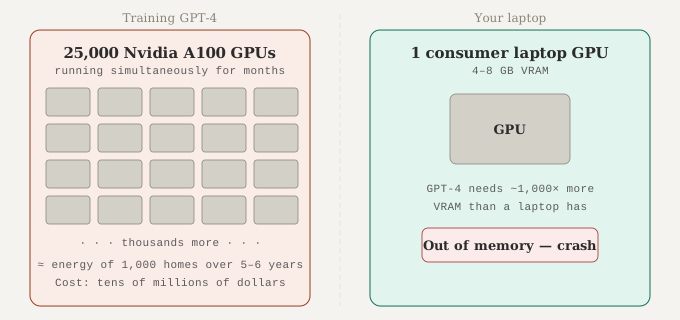
The amount of VRAM needed for even one decent reply is astronomical. Not possible on consumer hardware. I was close to giving up before I had even started.
I looked into AI agents next, but that led to more API costs, more cloud dependency, more tokens. Still using someone else’s infrastructure. Still not mine.
I was stuck.
💡 What is VRAM? VRAM is the memory on your graphics card (GPU). AI models use it to process information. A model like GPT-4 required 25,000 specialised Nvidia A100 GPUs running simultaneously for months, way beyond any consumer machine.
Then I Found Ollama
I gave up for the day and started watching YouTube.
Then I found it: Host ALL Your AI Locally by NetworkChuck. He was running AI entirely on his own machine. No cloud. No API tokens. No monthly costs. Completely local and completely free.
That video introduced me to Ollama. A tool that lets you download and run AI models directly on your own computer. And with it came the concept of quantized models, compressed versions of large AI models that can run on normal hardware without needing a data centre.
💡 What are Quantized Models? Think of a full AI model like a massive uncompressed audio file, perfect quality but enormous. A quantized model is like an MP3 – slightly compressed, but you can barely tell the difference, and it runs on normal hardware. Ollama uses these to make local AI possible on consumer machines.
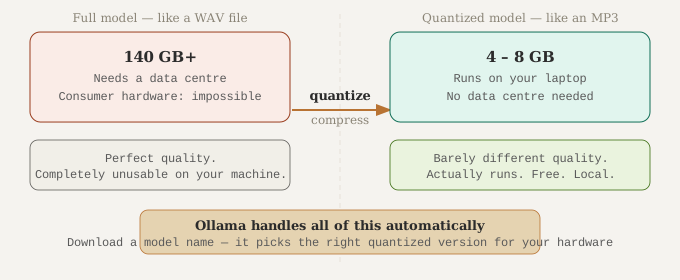
NetworkChuck had serious hardware. I had a laptop. But there was a model small enough to try. phi3:mini, built by Microsoft. Small. Efficient. Surprisingly capable.
I downloaded Ollama, read every page of the documentation, and tested their built-in chat interface. It was cool. It was useful.
But it wasn’t mine.
Building Her
I dusted off my API knowledge and started exploring the Ollama API. I picked up FastAPI, a Python framework for building backends – and started coding.
💡 What is FastAPI? FastAPI is a tool that lets you build a backend server in Python. Think of it as the engine room – it receives your message, sends it to Ollama, waits for the AI to reply, and returns that reply to whatever is asking.
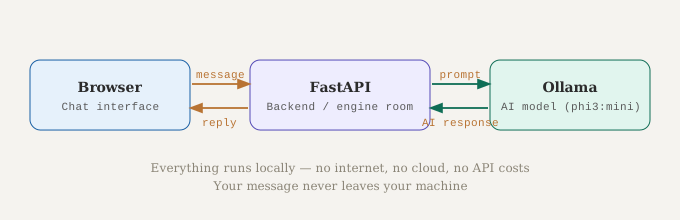
The backend was simple in concept: receive a text input, pass it to Ollama running phi3:mini, return the output.
// backend/main.py · Python · The engine room connecting the chat interface to Ollama
# Pull in the tools we need
from fastapi import FastAPI   # the framework that builds our server
import requests               # lets Python make web requests (to Ollama)
import os                     # lets us read environment variables

app = FastAPI()               # create the server, this is FARA's engine room

# Where Ollama is running — defaults to localhost if nothing else is set
OLLAMA_URL = os.getenv("OLLAMA_URL", "http://localhost:11434")

# This creates a route, when the chat interface sends a message to /chat,
# this function runs
@app.post("/chat")
def chat(message: dict):

    # Forward the user's message to Ollama
    r = requests.post(
        f"{OLLAMA_URL}/api/chat",
        json={
            "model": "phi3:mini",                            # which AI model to use
            "messages": [{"role": "user",
                          "content": message["text"]}],      # the user's actual message
            "stream": False                                  # wait for the full reply before returning
        }
    )

    data = r.json()                                          # parse Ollama's response

    # Extract the text of the reply (Ollama can return it in two different places)
    reply = data.get("message", {}).get("content") or data.get("response", "")

    return {"reply": reply}                                  # send it back to the chat interface
I tested it with different quantized model sizes to find the right balance between speed and quality on a laptop. Then it needed a face. HTML, CSS, JavaScript. I built a local chat interface. Animations to show when the model was thinking. Clean input and response bubbles. Something that actually looked like something.
// frontend/app.js · JavaScript · The chat interface that talks to the FastAPI backend
async function sendMessage() {

    const text = inputField.value.trim();  // grab what the user typed
    if (!text) return;                     // do nothing if the box is empty

    // Send the message to FastAPI running on our machine
    const response = await fetch('http://127.0.0.1:8000/chat', {
        method: 'POST',                                        // we're sending data, not just reading
        headers: { 'Content-Type': 'application/json' },      // tell the server it's JSON
        body: JSON.stringify({ text })                         // package the message as JSON
    });

    const data = await response.json();                        // unpack the reply from FastAPI

    // Display the AI's response in the chat interface
    spinnerMsg.textContent = `assistant: ${data.reply}`;
}
She was running. But she needed a name. Every serious AI project has one.
F.A.R.A — Fully Autonomous Remote Artificial Intelligence.
She was born. I ran the backend, opened the frontend, phi3:mini loaded and primed. I typed into the chat box:
“Hello.”
“Hi! I’m Phi3, a language model developed by Microsoft. How can I help you today?”
Wait.
“You are FARA.”
“I understand, but I am Phi3, developed by Microsoft…”
She had no idea who she was. No memory. No identity. Just a model doing what it was trained to do.
I closed the laptop. FARA worked; but she wasn’t truly alive. No memory between conversations. No internet access. No sense of self. And she absolutely destroyed my laptop’s performance in the process.
With a happy heart, I turned FARA off and played some games.
FARA v1 is open source. Clone the repo and run her yourself. She is the foundation. The mother of what came next.
Then I Played a Game
I opened Zenless Zone Zero and met Fairy.
Fairy is an AI character in the game. Almost human in her responses. She has emotions, preferences, humour. She learns. She remembers. She feels present. And she is Japanese-inspired.
That stayed with me. Not immediately, I just played and enjoyed the game. But somewhere in the back of my mind, something was brewing. A few days later I came back to FARA and looked at her differently. She could reply. But she couldn’t feel. She had no memory, no personality – nothing that made her worth coming back to.
What if she could have all of that?
Ryuu is Born
I started with the character. The frontend, the face. Inspired by Fairy but distinct. Green where Fairy is blue. Similar but her own. Family, not a copy.
Then I started thinking about lore. Who is this AI? What is his story?
Old. Wise. Patient. Caring. Deeply intelligent.
Almost like a dragon. And I had been learning Japanese on the side, so the name came naturally.
Ryuu 竜 – Japanese for dragon.
But Ryuu is not just a name. He is a character.
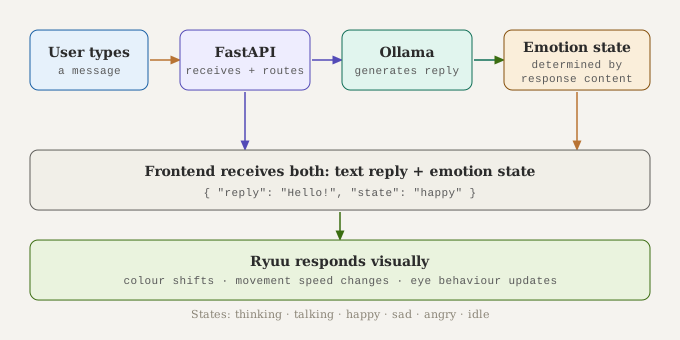
When you open Ryuu, you are not greeted by a chat box. You see an eye. Alive on the screen. It moves. It reacts. Depending on what is happening in the conversation, Ryuu shifts: colour, speed, and movement. When he is thinking, he moves differently than when he is talking. When he is happy the colour changes. When he is idle he just exists quietly, waiting.
These are his emotion states and they are not just visual decoration. The frontend is wired to the FastAPI backend. As Ryuu processes your input and generates a response, the backend triggers the right emotion state and the character on screen responds. It is not random. It is connected.
💡 How does the emotion state system work? The frontend is a browser-based character built with HTML, CSS, and JavaScript. The FastAPI backend passes not just the AI’s text response, but also an emotional context – thinking, talking, happy, sad, angry, idle. The frontend reads that context and changes Ryuu’s behaviour accordingly. Colour shifts. Movement speed changes. The whole character responds in real time to what the AI is doing internally.
Where I Am Now? Honest and Unfinished:
Ryuu can talk. He has a face, a personality, emotion states, and a name. But two things are still missing before he is truly alive.
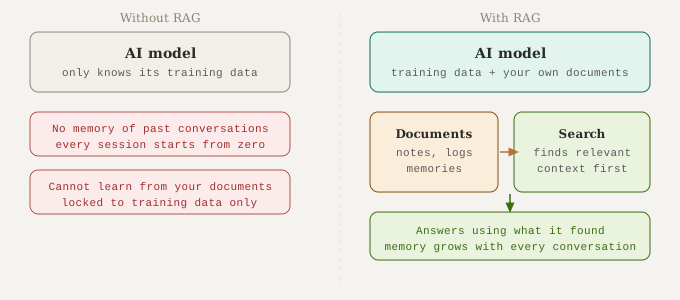
The first is memory. Right now every conversation starts from zero. Ryuu doesn’t remember anything from the last time you spoke. The solution is RAG (Retrieval Augmented Generation) which lets the AI search through documents or notes you give it and use that information when answering. It gives him a real memory to draw from.
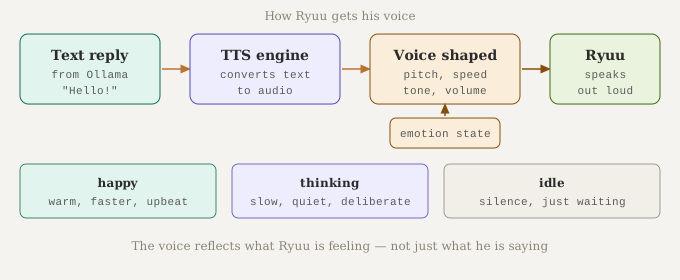
The second is voice. Ryuu’s responses are still text. TTS (Text to Speech) would give him an actual voice that matches his personality and shifts with his emotion state. Quiet and calm when idle. Warmer when happy. Slower when thinking.
This is where I got tangled. RAG, TTS, memory, identity. I tried to build it all at once and hit a wall. That wall is still there.
But I am not done.
FARA is the mother. Ryuu is the character. The journey now is merging them into something complete; a local AI dragon, running entirely on a Raspberry Pi 5, with memory, voice, emotion, and purpose.
Why Any of This Matters
I had a laptop, a YouTube video, and a curiosity I couldn’t shake.
“Whatever you do, work at it with all your heart, as working for the Lord, not for human masters.”
— Colossians 3:23
Building Ryuu has not felt like work. It has felt like creating. And somewhere in the middle of debugging FastAPI and designing emotion states, I realised something…
This is why God put me on earth. Not to already know how to create. But to figure it out. To fail, learn, adapt, and make something from nothing using every tool and skill He placed in my hands.
“For we are God’s handiwork, created in Christ Jesus to do good works, which God prepared in advance for us to do.”
— Ephesians 2:10
The skills are His. The curiosity is His. The push to just try. That was His too.
You don’t need to have it all figured out. You just need to start.
What’s Next
Ryuu is moving off my laptop and onto a Raspberry Pi 5 – his own dedicated home. The RAG system still needs to be cracked so he can actually remember and learn. TTS is still sitting there waiting. And somewhere in all of that, FARA and Ryuu need to fully merge into one thing: one local AI dragon with memory, voice, emotion, and purpose.
It’s not done. But it’s moving. And I will document every step right here.
“Commit to the Lord whatever you do and He will establish your plans.”
— Proverbs 16:3
Resources & Links
- FARA v1 on GitHub — clone and run her yourself
- Ollama — run AI models locally
- Ollama on GitHub
- NetworkChuck — Host ALL Your AI Locally — the video that started it